表单
注意区分表单与表格的区别。
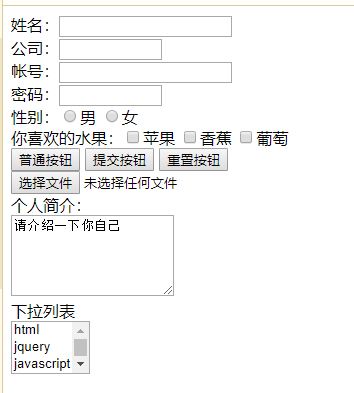
<form method="Post">
姓名:<input type="text" size="20"/></br>
公司:<input type="text" size="10"/></br>
帐号:<input type="text" size="20"/></br>
密码:<input type="password" size="10"/></br>
性别:<input type="radio" name="gender" value="男"/>男<!--radio表只能选一个,name表组名,只对同一组有效-->
<input type="radio" name="gender" value="男"/>女</br>
你喜欢的水果:<input type="checkbox" name="gender2" value="苹果"/>苹果
<input type="checkbox" name="gender2" value="香蕉"/>香蕉<!--checkbox表可同时选中多个-->
<input type="checkbox" name="gender2" value="葡萄"/>葡萄 </br>
<input type="button" value="普通按钮"/>
<input type="submit" value="提交按钮"/>
<input type="reset" value="重置按钮"/></br>
<input type="file"/></br>
个人简介:</br>
<textarea rows="5" cols="20">请介绍一下你自己</textarea></br>
下拉列表</br>
<select multiple="3" size="3"><!--multiple表同时选中的数量,用鼠标左键,size表可以同时显示的数量-->
			 <option>html</option>
			 <option>jquery</option>
			 <option>javascript</option>
			 <option>jquery</option>
		 </select>
		</form>


 婴儿手推车 :
 longfei :
 Tya :
Tya : buyongliao :
 WordPress 先生 :